Roamwise
LiveFree, open-source app for Windows and Linux that keeps you on the best Wi-Fi access point
Windows, Linux
What it is
Your computer tends to stick with the first access point it joined, even after you've walked across the building and closer ones are in range. On busy networks like offices, campuses, apartment buildings and mesh systems, you end up on a weak, slow connection while a strong one sits next to you.
Roamwise runs quietly in the system tray (or the top bar or panel on Linux), checks the access points of the network you're on, and moves you to a better one when it's clearly better.
Key features
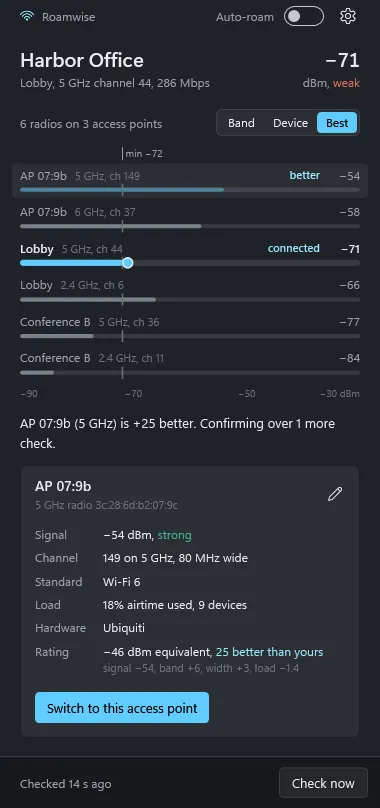
- Ranks for speed, not just bars: signal strength plus points for 5 GHz and 6 GHz, wider channels and Wi-Fi 6/7, minus points for busy access points.
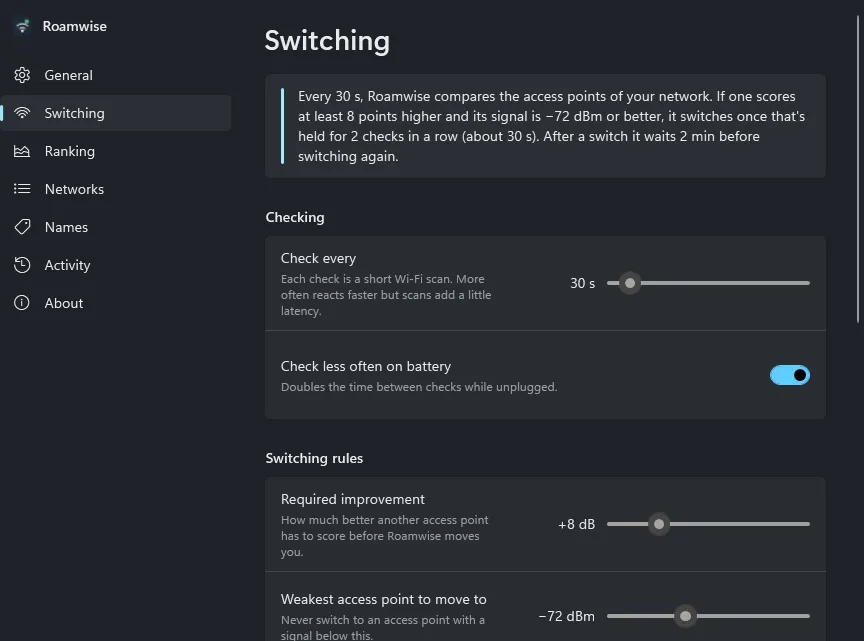
- Doesn't flap: a better access point has to stay better for several checks, beat yours by a margin you choose, and Roamwise waits between switches.
- Shows its reasoning: every access point on one signal scale, with a sentence saying why it's staying or switching.
- Groups radios into physical access points and names them, from your own names, your controller, an imported list, or the name the access point announces.
- Reads access point names from UniFi, Omada, Meraki, Mist and Ruckus SmartZone controllers with read-only credentials.
- Holds off while you're streaming, downloading or on a call, and can be paused for an hour.
- Passive, Balanced and Aggressive presets, with different rules per network.
- Optional low-latency mode that pauses the background Wi-Fi scans that cause lag spikes in games and calls.
How it works
On Windows, Roamwise calls the Native Wifi API with your existing profile and asks for only the target access point. On Linux, it asks wpa_supplicant to roam to the target within the connection NetworkManager already has. Either way the system does the actual connection, so nothing about your network's security changes.
Once a day it checks GitHub for a new release. Downloads come only from GitHub and must match the release's checksums.
It has no accounts, analytics or telemetry. Settings and controller credentials stay on your computer, and credentials are encrypted for your account.
Screenshots